Architecture - 2026-09-10 - 7 min read
Stage 1 of enterprise AI adoption: identity and the AI gateway
The first stage of enterprise AI adoption puts identity, roles, secrets, and an AI gateway in place so every later stage can answer who is asking and whether a call was logged and within budget.
This is part 1 of a series that started with the full reference diagram in part 0. Stage 1 covers the two columns marked 1 on that diagram. The first is IDENTITY & ACCESS, with SSO / IdP, Roles & scopes, and Secrets manager. The second is AI GATEWAY, with Routing, Rate limit & budget, Logging, and PII / DLP filter. Cloud LLM APIs sit on the enterprise boundary line, and every arrow to them passes through the gateway first. This stage comes first because each later stage assumes two questions are already answered: who is asking, and what did this call cost and was it logged. Retrieval scoped by role in stage 2 needs a role to scope by, and the budget caps in stage 5 need per-team accounting that started on day one.
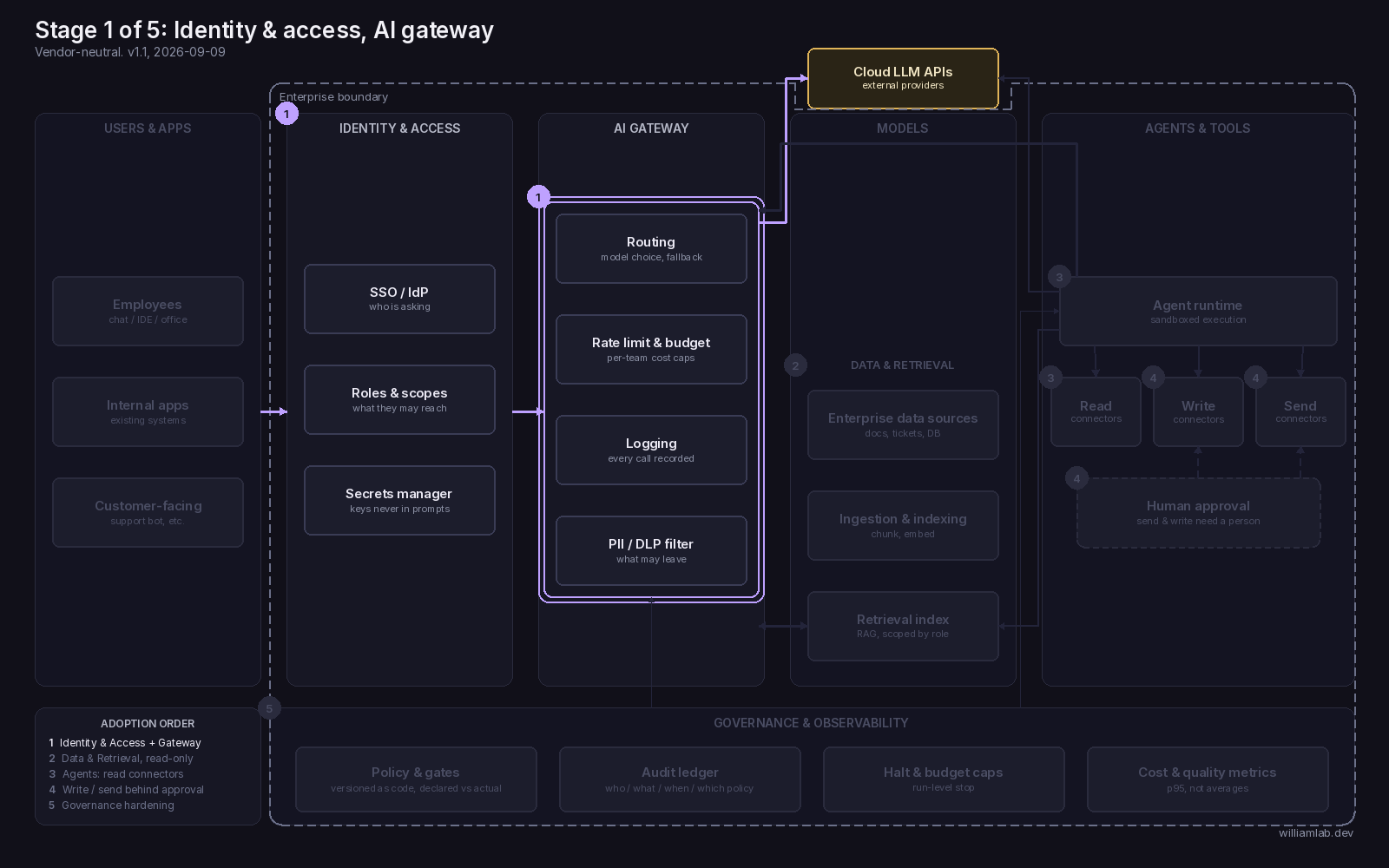
To walk the seven boxes I use a company called Qingchuan, about 40 people, 8 engineers and 2 in marketing. Qingchuan is made up and only serves to walk the stage. Before stage 1, people at Qingchuan opened accounts on their own, some on a company card and some on their own, and each engineer pastes a personal key into whatever tool they use.
SSO / IdP: who is asking
Every request to an AI tool carries an identity issued by the company's identity provider. The label on the box is "who is asking". Without it, Qingchuan cannot say who is using which tool, and when someone leaves, their accounts and keys stay live. I ran into the one-person version of this myself. A publishing platform had two accounts under my name, the script's API key was bound to the old one, so every draft the script created landed there, and the new account open in my browser showed zero drafts. Nobody pasted anything wrong. With ten people each holding their own accounts, the company has no list to start an inventory from. Done looks like this: an account exists only if the identity provider issued it, and disabling a person there disables their AI access in the same step.
Roles & scopes: what they may reach
Once SSO answers who, this box answers what that person may reach: which models and which tools, and from stage 2 on, which data. The label is "what they may reach". Without it, everyone who logs in gets the same access. Identity has solved the inventory problem and left the boundary problem open. At Qingchuan, an engineer and a marketing person hit the same endpoint with the same allowance. Done looks like this: a role is assigned at login and carried through to the gateway, the two marketing people get a scope that differs from engineering, and the difference is enforced by the system. A change to a prompt changes nothing about what a person may reach.
Secrets manager: keys never in prompts
Provider keys, tokens, and connector credentials live in a store that services read at runtime. The label is "keys never in prompts". Without it, keys get pasted into chat windows, config files with plaintext keys get shared around, and the key that runs a workflow is tied to one person's account. The rule I keep for my own sessions: a session may read the config file that holds a key, it may not print the value, and no person pastes a key into the conversation. When I rotated a key, the plaintext went from the clipboard straight into the file and never appeared in the session. The other half of the problem is which account the key belongs to. I had two accounts on a site analytics console, one for the brand and one personal, in two login slots of the same browser. Opening the wrong slot returns no permission, so before touching that console I check which account is open. That check exists because the key and the account belong to a person. Done looks like this: no key belongs to a person, each workflow that connects to a system gets a company-owned identity issued by whoever administers accounts, and a key appears nowhere in a prompt, a chat log, a ticket, or a shared config file.
Routing: model choice, fallback
Applications call one internal endpoint, and the gateway picks the model and falls back when one is unavailable. The label is "model choice, fallback". Without it, each of Qingchuan's teams wires its own provider, and a model change becomes a change in eight codebases. Done looks like this: applications call the gateway, and switching a model is a gateway configuration change with no application deploy.
Rate limit & budget: per-team cost caps
Each team has a cap, and the gateway refuses the next call once the cap is reached. The label is "per-team cost caps". Without it, the bill arrives once a month with no split by team, and a runaway script can spend a month's allowance in a night with nobody finding out until the invoice. Done looks like this: the gateway refuses calls over the cap, and the team sees the refusal before finance sees the invoice. This cap works at the level of the next call. Stopping a run already in progress belongs to Halt & budget caps in stage 5.
Logging: every call recorded
Every call is recorded with who made it, which model answered, how many tokens it used, and what it cost. The label is "every call recorded". Without it, when something goes wrong the only way to find out what happened is to ask the person or the AI. Done looks like this: any recent call can be found by person, team, or model, without asking the person who made it. This log is what stage 3 compares the agent's own report against, and it is what the audit ledger in stage 5 reads from.
PII / DLP filter: what may leave
The filter inspects outbound content before it crosses the boundary to an external provider, and blocks or redacts what should not leave. The label is "what may leave". Without it, a support person at Qingchuan pastes a customer record into a chat window to draft a reply, and the record has left the company before anyone notices. Done looks like this: a call carrying a pattern that should be blocked is blocked at the gateway, and the block itself shows up in the log.
Cloud LLM APIs on the boundary
The provider box is drawn on the enterprise boundary line, and every arrow into it comes from the gateway. Without that placement, the six boxes above can all be in place and still be bypassed by one engineer with a personal key and a direct network path. Done looks like this: the only network path from inside the boundary to an external provider goes through the gateway, and a direct call with a personal key fails.
The exit check before stage 2
Run this as a test with a real new account. A new hire logs in through SSO and gets the role scope their team is supposed to have. The same person sends a call that goes over budget and the gateway refuses it, then sends a call carrying a pattern the PII filter should block and it is blocked. All of it happens without a person watching. Reading the configuration and concluding it would work does not count. The second half of the check covers what existed before stage 1: every personal account and key found in the inventory has been revoked or moved to a company-owned identity. Until that list is empty, the stage is still open.
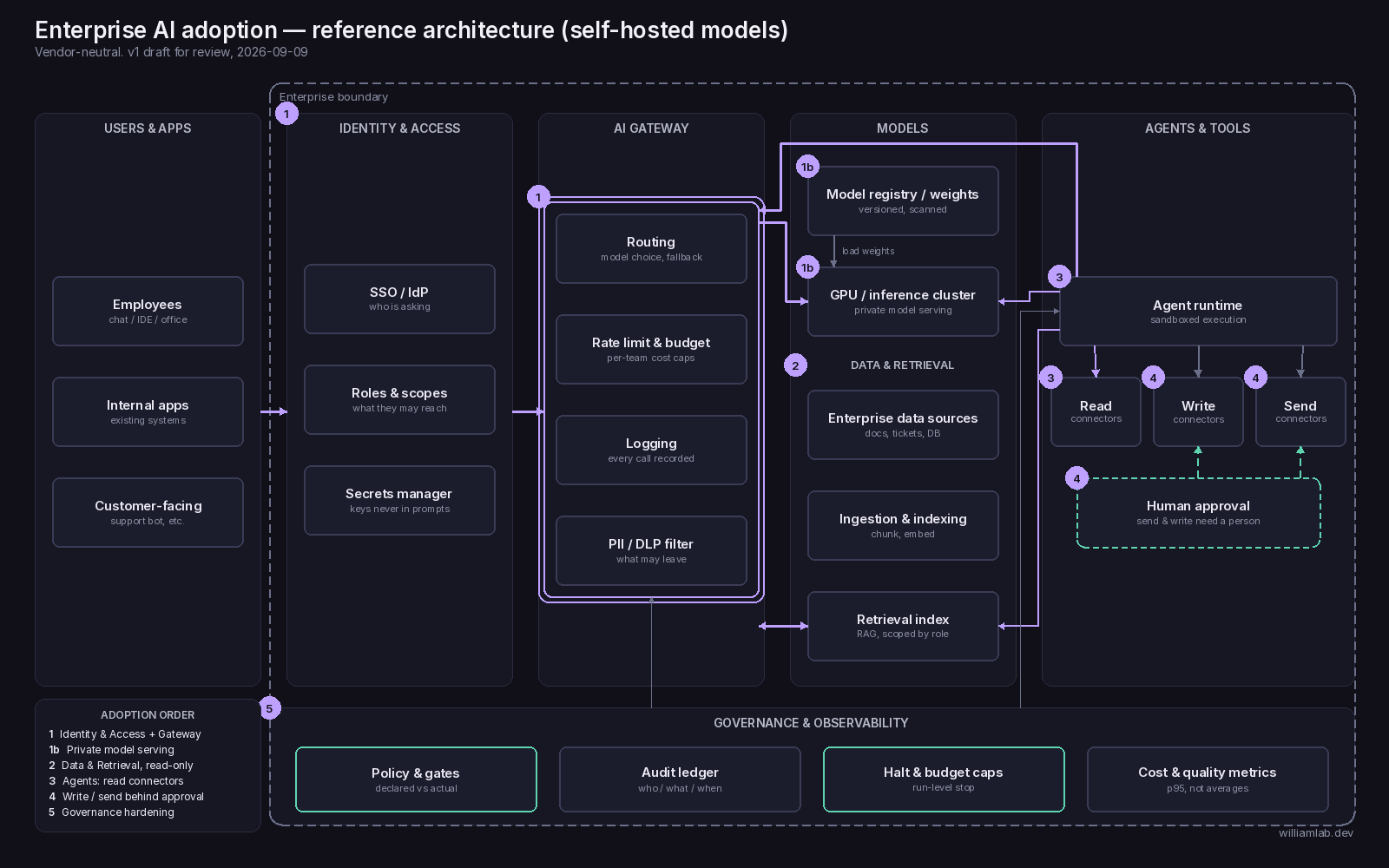
On the self-hosted diagram, stage 1b replaces Cloud LLM APIs with Model registry / weights and GPU / inference cluster, both inside the enterprise boundary, and the gateway and identity columns are unchanged; the self-hosted full diagram shows the swap. Part 2 covers data and retrieval, where the Roles & scopes box from this stage becomes the thing the retrieval index is scoped by.
Working on something like this?
I help teams ship AI-native systems — architecture, governable autonomy, and the evidence discipline to back them. One conversation is enough to see whether it fits.
Discuss fit